
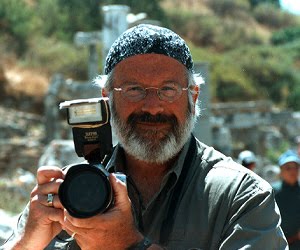
MORNING LIGHT IMAGES Selected photographs of Jeff Perkins. I'm both a physician and serious photographer. Accomplishments: Permanent Exhibit at The Albany International Airport entitled "Arrival", located at the Security Entrance. This is a 3 panel 18 foot long panorama of stitched images reflecting our feelings of safe journey after 9-11. Exhibits at The Soho Gallery in NYC and The Photo Center of Troy, NY Enjoy. Jeff
Sunday, August 26, 2012
Texture


Saturday, August 18, 2012
HDR Heaven

Old Car

Oldsmobile

Cracked Window

Interior
Out with my great Bud Jeff A. today for an HDR Photo shoot. We found this auto salvage yard and had a blast! This are HDR fun pics shot with a Fuji X10, 3 bracketed images one stop apart and then blended in Photomatix software. Minor adjustments were made to give these an Artsy-Fartsy result. What a hoot! Enjoy Jeff
iPhone HDR

Thursday, August 16, 2012
Soft Macro Technique

There are many techniques to create a soft Macro look. Usually one is concerned that everything is in focus, front to back in Macro Photography. However there are times that a different approach can yield nice results. This rose was shot with a maroon background outdoors with available overcast light. The Maxxum 7D was on a tripod with a 50mm 1.7 standard lens and a Canon 500D closeup filter attached. It was fun exploring the petals and selecting which one should be sharp. At f1.7 the rest would go soft, my intent! There was minimal editing in Photoshop. Enjoy, Jeff
Friday, August 10, 2012
This morning's gift

Thursday, August 9, 2012
Catching the Light
I knew it was coming. The three mast sailing vessel was going to bisect the setting sun's reflection on Newport Bay. Simply set the Fuji 10 to Av priority at f 5.6 and let the meter do the rest to create a lovely silohouette. Enjoy, Jeff


Boats in Fog

Trees in Fog

Wednesday, August 8, 2012
Newport Harbor at Sunset

Tuesday, August 7, 2012
Newport Reggae

Monday, August 6, 2012
Wide Angle Perspective

Sunday, August 5, 2012
Newport Morning

Shot on the iPhone 4 using 645 PRO. This App allows for a 6MB lossless jpeg. What a difference compared to any other Camera App. I lightly edited the image in Snapseed. Enjoy, Jeff
Saturday, August 4, 2012
The Fisherman

Wednesday, August 1, 2012
Saratoga in Motion

Shot with a Maxxum7D, KONICA MINOLTA DIGITAL CAMERA and a Tamron 28-300 Lens. This image is different than the ones a couple of posts below. Here I went for motion and speed. At ISO 800 I chose a Tv of 1/100 sec to capture enough to clearly convey the subject matter, but not to fast to freeze motion. 1/250 or greater would have done that. I chose an f stop of f13 to insure the horses would be sharp from front to back. The final, key ingredient was panning the camera while firing away, thus the blurred background. See, it is easy!! Enjoy, Jeff
Sunday, July 29, 2012
iPhoto Art
This is an example of what I will be teaching Sept 9th at the Sand Lake Center for the Arts. Check out their newsletter, on page 9, announcement at bottom.
Link :http://slca-ctp.org/newsletters/Newsletter.pdf
OriginaliPhoneArtsifedYou all know how much I love working with my iPhone and creating Artsy Images. This is an example of why Smartphones, like the iPhone have created a paradigm shift in Personal Photography. You drive by a gloomy willow in a frozen pond, you have your Best Camera with you, snap a few shots. Later when you have some time you edit and play with the image until you get something that is pleasing. This image was developed in Photoforge where I adjusted the levels to create more contrast, added a bit of watercolor and oil filters, then vignette. Sent it next to PS Express for the frame. Whew, what fun! Enjoy, Jeff


Wednesday, July 25, 2012
The Backstretch
 I had the good fortune to be at Saratoga Raceway today due to the kindness of my friend Bob. Bob is a horse owner and thus provided me with a pass to the backstretch region of the track, allowing excellent positioning to capture the action. These types of shots are best done with DSLR and Tele lens. For this shoot I used a Fuji S3 Pro paired with a Nikkor 55-200 VR ED Lens. To stop action, reduce camera shake, I set the ISO to 800, Exposure to 1/1000 sec at F 9.5 or 11, depending on the light. With a tele lens and it narrow DOF at 200mm, it is important to set a high f stop to capture detail at this distance. All of the images were lightly edited on an iMac with iPhoto.

Here I focused on the body of this animal.

Notice how a1/1000 sec exposure stops even the flying dirt.

Here I focused on the legs. That is where the action is!

Post race portrait of Ramon Dominguez on Pleasant Prince
See, I don't just use an iPhone! Enjoy, Jeff
Saturday, July 21, 2012
Louvre as seen with Wood Camera

Wednesday, July 18, 2012
Lady with Babushka

Enjoy, Jeff
Saturday, July 14, 2012
Hay Rolls
 I saw this field this morning. I was reminded of the importance of farming in America. Shot this with my iPhone ( the camera always with me) in Camera+, further edited in Wood camera and Snapseed for filters. The birds were added in Wood camera, one of the coolest filters I have seen.
Before my Smart/camera phone I had to carry a regular cell phone and sometimes when I felt like carrying, a pocket digital camera. In the film days it was a Rollie Prego 35mm ( which is a great pocket camera), Needless to say I often tired of two items on my belt that always were getting knocked off when I sat in an armed chair! When the iPhone came along, I saw the wisdom in getting one and have never looked back.
Not only do you have a phone, but a decent camera now and the ability to edit on the fly, artsify and upload your images to your Blog , Facebook, Twitter, Picassa and other social media, as well as emailing pics to your friends.
It is a great time to be a photographer! Enjoy, Jeff
I
Monday, July 9, 2012
iPhone Street Photography

Capturing the rush in the snow, the urgency to get indoors made a good street shot. I like a more uncluttered street image, emphasizing the main subject. Angling the camera up helps. The image was processed from color in Simply B&W for the final result. Enjoy, Jeff
Macro with the Fuji X10

Macro photography is always a challenge! Especially when the subject is moving! I found this little beetle, brought it in with a large leaf for background, set it up on the table and placed the X10 on a Gorilla pod. The X10 was then placed in Super Macro Mode at about 28mm with beetle 1 inch or so from the lens. Focus was on the left front quarter. Note how sharpness falls off on the right. Shot at f4.0, ISO 800 and 1/25 sec. Took about 20 shots to get it right. Enjoy, Jeff
Sunday, July 8, 2012
Macro with iPhone 4 and Photojojo macro lens

Friday, July 6, 2012
Macro with iPhone 4

Thursday, July 5, 2012
B&W Photo Hi Key
Check out this black and white photo I edited with Simply B&W : I love this app. It does a great job converting color to B&W . The filters applied mimic color filters I used in the film days. This portrait of Supermodel Rebecca West shot with my Maxxum 7D and a 60mm 2.8 macro portrait lens was converted with an orange filter to thus lighten the skin tones. I added a vignette and a little contrast to create this Hi Key portrait. Enjoy, Jeff

Sent from my iPad
Wednesday, July 4, 2012
Americana

Monday, July 2, 2012
Popsicolor Photo App and Pic Stich

Sunday, June 24, 2012
Eiffel Tower Again

Saturday, June 23, 2012
Old Flowers

Monday, June 11, 2012
The Eiffel Tower at Sunset

This shot was taken from Trocedaro, overlooking the Eiffel Tower. I specifically got to the location just before sunset as I knew the Tower would be glowing with the sun so low on the horizon, perpendicular to the Tower. I had to do a little lens distortion correction in PS CS. Shot with a Fuji X 10, Handheld. Enjoy, Jeff
Paris and HDR

Taken with a Fuji X10 with 3 exposures, 1 stop apart, processed on Photomatix Pr0 4.2. The X10 allowed the HDR because it takes the 3 exposures with one shutter opening, thus the advancing motion of the boat is not a problem. Enjoy, Jeff
Subscribe to:
Posts (Atom)